The frontend takes shape.
The agent builds widgets, forms, lists and charts, then places them on your dashboard. Ask it to move, extend or simplify what it built.
 the last
Prism starts with an agent and a workspace. Describe what you need: it builds the tools, interfaces and automations that turn that space into your solution.
A project tracker, CRM, ticket board or a blend of them: the agent shapes the dashboard and backend tools around the way you work.
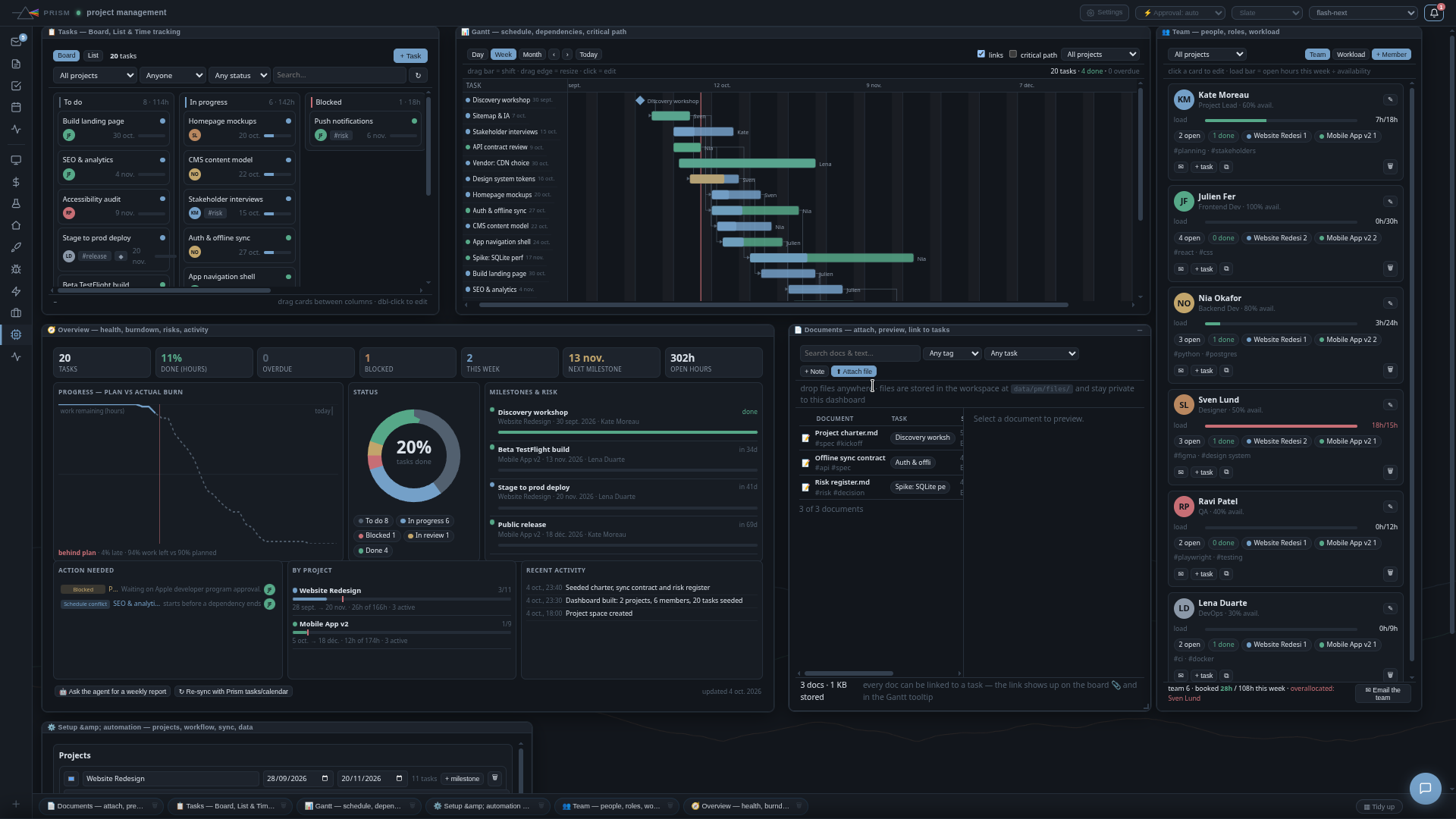
An agent-built dashboard. An actual Prism screenshot.
A tracker, business interface or something entirely new: start with your need, not a software catalog.
The agent builds widgets, forms, lists and charts, then places them on your dashboard. Ask it to move, extend or simplify what it built.
Files, Python tools, APIs, cron and Docker services where supported: the interface can act on your data and evolve without a new Prism release.
It writes code, keeps data, builds backend tools and interactive widgets. Ask for a change and it adapts your workspace.
Email, calendar, tasks, notes and MCP servers. Get your tools working together.
Explore integrations →Schedule research, a digest or a recurring task. Find the result in Prism or a connected channel.
Notes and knowledge bases give the agent the information it needs for your work.
Keep your own space or create groups with a shared agent for a trusted team.
Explore team mode →Pick an idea to see how you could approach it with Prism.
“Prepare my day using my calendar, tasks and important emails.”
01 Connect the accounts you need.
02 Gather and summarize the information.
03 Build a widget and schedule the digest.
A workflow idea to adapt with your agent, models and connections.
Install Prism, choose your models and shape your workspace.
On your own machine or server, with Docker Compose.
Browse the source code, report a problem or suggest an improvement.
Prism on GitHub ↗Free and open-source tools →You make requests in natural language. Self-hosting requires familiarity with Docker and configuring an AI provider. After that, the agent can guide you and build tools for you.
You host Prism and choose the services it uses. With a local model, you can process requests locally. If you connect an external API or application, some data is sent to it to carry out your requests.
Prism aims for simple tools that small models can combine. Choose a model with tool calling and test it on your use cases: performance depends on the model and your hardware.
Prism is free software under the MIT license. Self-hosting requires your own infrastructure and may involve paid APIs.