
PrismVox console settings
Standalone PrismVox uses its own console. When docked to Prism, the console redirects to Prism and the corresponding administrative controls appear under Admin → Telephony. The protected PrismVox API remains available to that integration.
Configuration → SIP / Telephony
A single SIP line
Configure PrismVox as a Centrex endpoint, like a Yealink or Grandstream IP phone: one SIP line registered on your operator’s network. The operator’s public SBC handles NAT traversal. Keep PrismVox on your private network; publishing its console or SIP service to the Internet is not required.
Registrar, Registrar IP and SIP domain
Enter the registrar/SBC hostname and IP supplied by the operator. SIP domain is the service domain for the line; it need not be the same as the registrar hostname. These are operator addresses, not the address of the PrismVox server.
Match (optional)
Identifies incoming SIP requests from the operator’s signaling addresses. Leave empty to reuse Registrar IP, or use the IP/CIDR supplied by the operator when inbound signaling comes from another address. This field is not your local IP or an RTP destination.
Username, Password and Display name
Use the line’s authentication username and password. The username may differ from its telephone number. On an existing configuration, leave Password empty to keep the saved secret. Display name (From) sets the name on outbound calls; it is not an authentication field.
Transport and trust
Choose the operator’s transport and remote port: TLS + SRTP uses TLS signaling with SDES-SRTP audio; UDP uses unencrypted SIP/RTP. Defaults are remote TLS port 5061 and UDP port 5060. Keep SIP_TLS_VERIFY_SERVER enabled; a private CA is configured through SIP_TLS_CA_FILE and a read-only mount in Asterisk.
Save, Apply and verification
Save stores the line settings without activating them. Apply (reload the trunk) saves the form, writes the Asterisk configuration and requests its reload. Check the success message, then refresh Line state. Confirm registration and place a real call with audio in both directions; an indicative endpoint state alone does not validate the line.
Transfer method
bridge keeps Asterisk in the media path while dialing the destination. refer uses SIP REFER so the provider/PBX handles the handoff. Choose the method supported by your trunk; it is separate from a contact’s blind-versus-attended preference.
Configuration → Agent
Inbound persona and greeting
System Prompt defines role, tone and limits; Greeting is the fixed opening before an inbound model response. Keep sentences short for speech and use the call language. Add facts to Knowledge instead of growing the persona into a document archive.
Outbound persona
Outbound System Prompt defines the agent’s role during outbound missions. The specific mission is appended to it. No fixed inbound greeting is used; test the opening, question collection and end_call behavior with a test recipient.
Standard and on-call models
Standard handles standalone inbound switchboard calls. On-call handles outbound missions, transfer-recipient conversations and Admin chat. Test the agent uses the standard model; recognized phone callers use Prism when connected. Set the exact model IDs; optional per-tier API roots include /v1. Empty roots reuse OPENAI_BASE_URL. A different endpoint does not receive the gateway key.
Dialog turns and feature switches
Dialog turns — attended transfer limits exchanges with the recipient, from 1 to 10 (default 3); more exchanges keep the caller on hold longer. Enable knowledge search only with relevant documents and MCP tools only after reviewing the connected servers. Save the Agent form after edits.
Speech providers
Provider and language
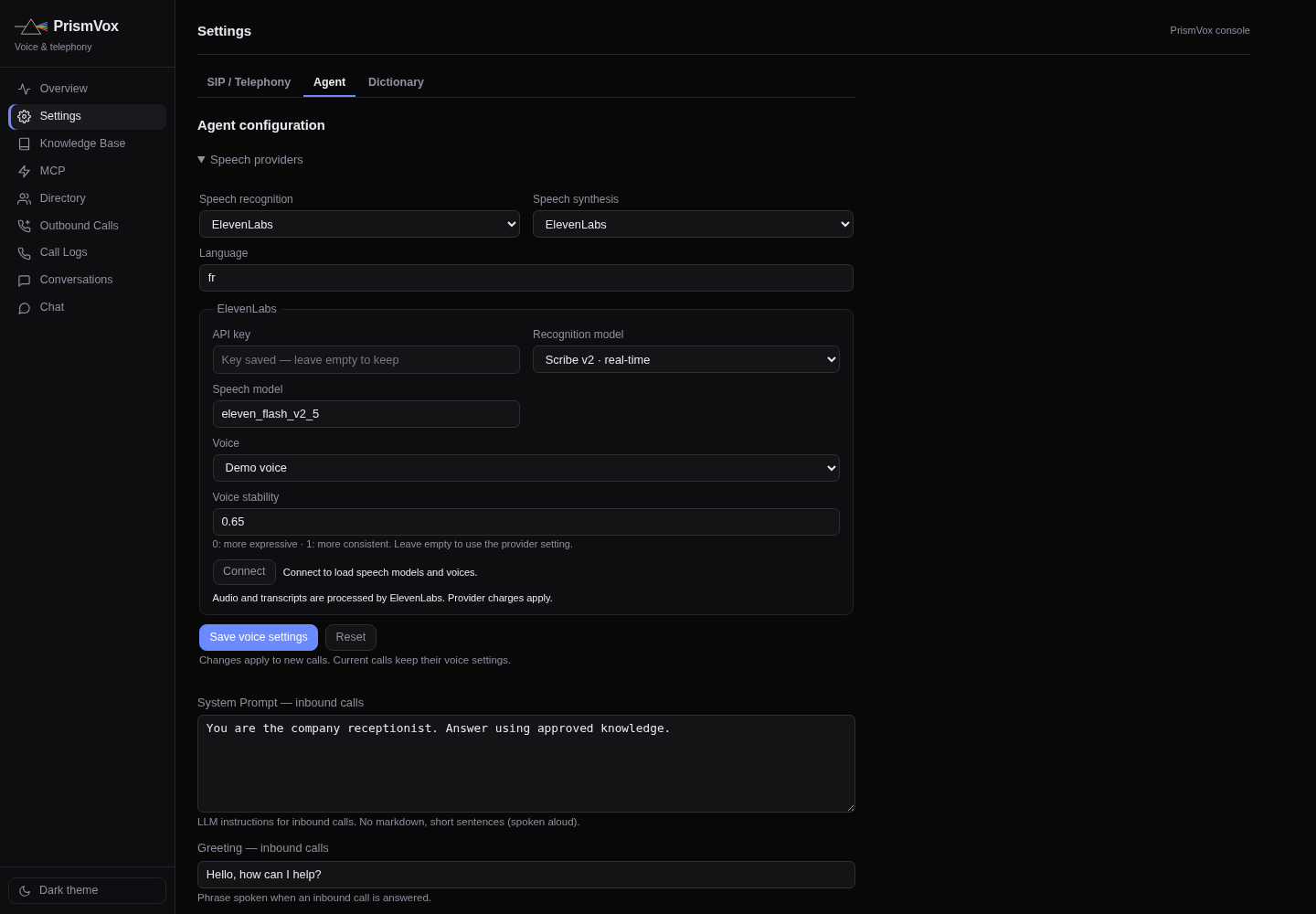
Recognition and synthesis have separate provider selectors. ElevenLabs is the direct streaming default. Self-hosted · OpenAI-compatible API targets your external compatible server; Legacy HTTP service uses the older contract. Set a two-/three-letter language code consistently with spoken prompts.
ElevenLabs connection
Enter the API key, click Connect to load allowed models/voices, choose recognition/synthesis models and a voice, then Save voice settings. Connecting alone is not a save. Missing Models Read permissions can prevent catalogue loading while retaining a selected model. A blank credential preserves the stored key.
Voice and stability
Choose a voice from the provider catalogue and use Listen for a real synthesis preview. Stability accepts 0–1 or an empty provider default. The selection and preview are not a model benchmark; verify pronunciation and continuity over a real call.
External STT/TTS
Set each API root, model ID and optional external TTS voice. The optional service key is separate from ElevenLabs and shared by the external STT/TTS connections. OpenAI-compatible synthesis must return WAV; arbitrary vendor-specific APIs need an adapter outside PrismVox.
Voice management
Recording/upload and deletion depend on provider capabilities and permissions. For external OpenAI-compatible APIs, manage voices on that external server. Only upload voice samples you are entitled to use; browser recording needs localhost or trusted HTTPS.
Phrases and Dictionary
Fixed phrases
Configure farewell, hold, transfer, caller-name/reason questions, still-there and unknown-contact phrases in the call language. Preserve required %s placeholders: one for a name in connecting/unknown-contact phrases, two for caller name and reason in an announcement.
Dictionary
Recognition hints help domain names and vocabulary when supported by the STT provider. Acronyms to spell out and pronunciation exceptions control how speech is rendered. Saved dictionary settings override bootstrap environment hints. Save and test a sentence containing the changed term.
Knowledge and MCP
Knowledge Base
Create a collection, upload factual documents and wait for ingestion/embedding. Enable the retrieval switch in Agent. Keep knowledge concise and current; the local embedding service and 384-dimensional pgvector schema differ from Prism’s configurable embedding providers.
MCP servers
Configure a server name, supported Streamable HTTP or SSE endpoint, enabled state and optional authentication. Inspect its tools before enabling the global MCP switch. Only connect trusted tools: a telephone caller can influence the requests that reach the agent.
Directory and outbound calls
Directory
Set a contact name, dialing destination and blind/attended transfer preference. Test the actual dialing format accepted by the trunk. When docked, Prism supplies profile-based contacts and transfer settings; configure the relevant user profiles rather than assuming two independent directories are synchronized.
Outbound Calls
Create a mission with an intended recipient and inspect queue status, attempts and outcome. Use a consenting test recipient first. Cancellation stops queued work where supported; do not assume removing a row retroactively ends a call already being bridged.
Overview, Call Logs, Conversations and Chat
Overview and history
Use service readiness and aggregate activity to spot failures. Call Logs and Conversations expose transcript/tool activity for diagnosis; restrict console access because call contents may be personal. Chat tests the conversational model but does not validate SIP, RTP or microphone recognition.