
Prism settings and Admin
Settings contains your personal preferences and connections. Admin manages deployment-wide choices in shared mode. A screen may be absent when its app is disabled or your account does not have permission.
Profile and AI provider
Profile
Display name and avatar identify you to the agent. Email is contact information, separate from your sign-in username. Timezone accepts an IANA zone or the browser zone; use this before creating scheduled tasks. Phone and incoming-transfer fields appear only when PrismVox is connected.
AI provider
In personal mode, configure connections here. Shared deployments put this page in Admin instead. Use the detailed provider guide for sources, credentials, model selection, context, vision and embedding rebuilds.
Agent identity, prompts and execution
Name, avatar and personality
Set the default identity and working style. Workspace-specific personality can refine that role without changing the whole deployment. Keep factual company knowledge in documents and permission rules in the appropriate access settings.
Prompt profile
Guided provides more explicit instructions for smaller models; Standard is more compact; Minimal is intended for more autonomous models. This changes guidance, not the permission checks enforced by Prism.
Iterations, thinking and effort
Maximum iterations bounds tool/model loops in one turn: the form accepts 10–500, with 75 as the ordinary default. Extended thinking and effort depend on backend support. A larger limit does not make an unreliable model reliable and may increase cost.
Approval and Stop
Approval in the chat header selects automatic or manual tool approval. Stop cancels the current task. Scheduled tasks and external channels run without a person available to approve each call; review their permissions before enabling them.
Email, Notes and Calendar
Email account
Choose the provider preset, email/login and application password. Advanced server settings set IMAP/SMTP hosts, ports, implicit TLS or STARTTLS, and certificate handling. Save & connect tests the mailbox before saving. A normal Gmail account password is not an app password; Proton needs its Bridge credentials.
Notes storage
Database stores notes in Prism’s database. Markdown vault uses an accessible server directory; a folder on your laptop is not visible to a server container without a mount. Configure NOTES_VAULT_PATH, recreate prism-server, then select /vault. Review sync direction and back up existing files before a first import/export.
Calendar and tasks
Choose local storage or connect CalDAV with its URL, username and app password. Select the calendar and task source explicitly. Google/Microsoft calendar need your own OAuth app and browser consent; Todoist needs its credential. Disconnecting a provider changes the active source, not a backup/import of all remote items.
Tools, Resources, Knowledge and Secrets
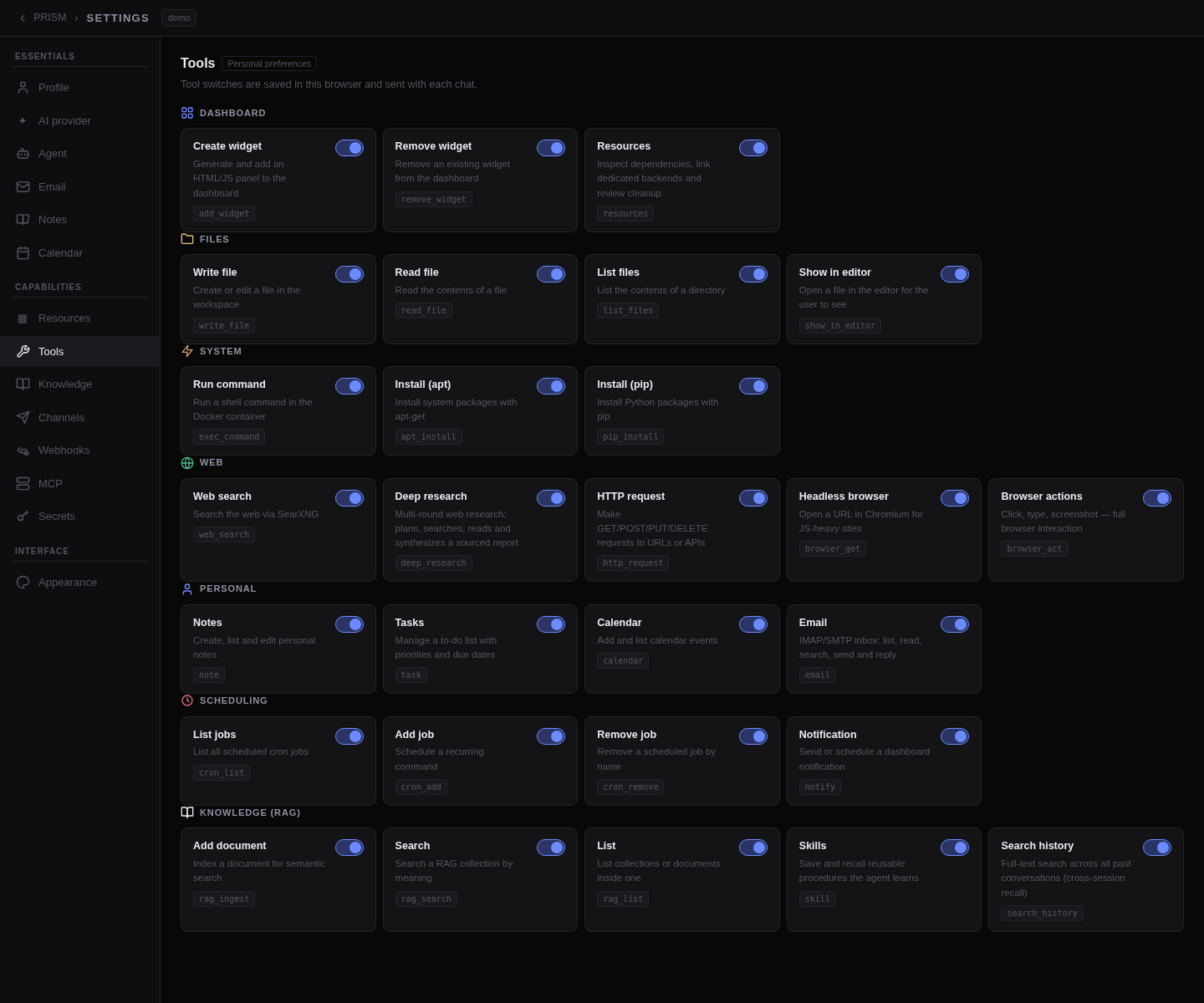
Tools
Review built-in, custom and MCP tools. A personal switch hides a tool from your agent; shared-mode administration may impose stronger restrictions. Tool switches do not delete the backend files, containers or scheduled jobs.
Resources
Inspect backend resources, dependencies and usage by widgets/workspaces. Review deletion previews and shared references. Data and legacy resources can be retained: read the selected cleanup actions instead of assuming a removed widget also removes every file it ever used.
Knowledge and Skills
Documents are grouped into described collections. Choose the intended scope, upload sources and wait for indexing after embeddings are configured. A clear collection description helps the agent search relevant material. Skills store reusable procedures; deleting a collection is not the same as disabling its use for a conversation.
Secrets
Create script/tool credentials in the secure form or the agent’s secure request dialog. Do not paste them into chat. Stored values are encrypted and are not displayed on ordinary read APIs; names and scopes identify the secret to authorized tools. AI-provider-only keys belong in AI provider.
MCP, channels and webhooks
MCP
Enter a server name, supported HTTP endpoint and optional credential reference. Check the discovered tools. Refresh reconnects and reloads the tool list after a server update without removing the server; a refresh failure retains the previous list. Group servers are managed in Admin.
Channels
Connect your Telegram bot with its token, then link the intended chat. Slack and Webex depend on deployment role and shared-agent settings. Each channel gives another route to agent actions: restrict the linked identities and avoid publishing bot credentials.
Webhooks
Set a name, target conversation and prompt; optionally use {{content}} to insert the incoming payload. Changes save when created/edited. Copy the generated URL/token exactly. The default acknowledges receipt while the task runs; Wait for the agent waits for a result and requires a caller with a sufficient timeout.
Appearance
Theme and layout
Choose a theme, font, UI scale, density, background effects, chat position and window behavior. Browser preferences apply immediately; custom themes use Save & apply. These choices do not change tool access or the model.
Shared-mode Admin
Accounts and groups
Approve users, assign roles and group memberships, then configure group agents, rooms and sharing. Use global-admin privileges for deployment settings and group-admin privileges within their scope. Inspect a member account to verify effective access.
Models, policies and integrations
The global administrator manages AI provider sources, allowed models and platform-wide availability. Group tool permissions, knowledge, MCP and secrets shape the group agent. Personal preferences cannot override an administrator’s denial.
Telephony
Visible when PrismVox is connected. Configure SIP, voice providers, greetings, directory/transfers and the conversation model for recognised callers. The dedicated phone model applies to new calls; changing it leaves the web model and caller permissions intact.